
Ondago Cloud may appear as Secure Cloud in your installed app.
Start an Agent Discussion#
Use an Agent Discussion to explore a design, compare approaches, or review a plan before implementing it. Two to four agents discuss your question with each other: they read a shared conversation and answer each other under their own names, and you decide what gets built. The discussion appears as one session in your session list. Earlier versions of Ondago call this Discussion Room.
- Choose New session or Start a new session, then switch to Agent Discussion. Session starts a task with one agent.
- Write the question, context, and constraints in What would you like to discuss?.
- Check where it runs: a connected computer or Ondago Cloud. Select the project or repository offered for that location.
- Choose two to four participants and give each a useful Display name, such as Architect or Reviewer. Open a participant’s Details to change Mode, Model, Thinking effort, or account.
- Check the participant count, then choose Start discussion in the dialog footer.
Choose participants and models#
While the launcher stays open, switching locations or switching between Session and Agent Discussion preserves each message draft. If a participant’s saved account is unavailable, open Details and choose an available account before starting.
Keep the suggested name or give each participant a name of your own. Mix available agents, or use the same agent more than once to compare models. Open a participant’s options to choose an account, model, and thinking effort where supported.
Computer launches use the agent accounts available on that computer. Cloud launches offer the workspace provider keys and connected ChatGPT cloud accounts available to you. Resolve missing agents or accounts before starting; changing the location can change which participants are available.
Start from an existing conversation#
In a session that offers it, choose Continue as discussion from the conversation controls. Your current agent becomes the first participant with its existing native session context. The discussion automatically keeps the session’s project; there is no project or folder to choose again. Choose additional participants and enter the question you want them to discuss. You can keep the current location or move the session and working folder to Ondago Cloud or another computer where the same project is available. Finish or stop the current turn before starting. Other participants receive the published conversation; private native context stays with the original agent. The Agent Discussion becomes the active continuation, with the original session under Previous. If the native session or a required account is unavailable, resolve that before continuing.
Follow the conversation#
Speaker labels identify each participant’s contributions. The discussion shows the active participant and whether it is discussing, summarizing, implementing, or reviewing. Select a participant’s name to inspect its agent, account, model, and role.
Discussion and peer review use restricted tools. Implementation begins only after you choose a direction and explicitly ask a builder to make changes.
Turn the outcome into a direction#
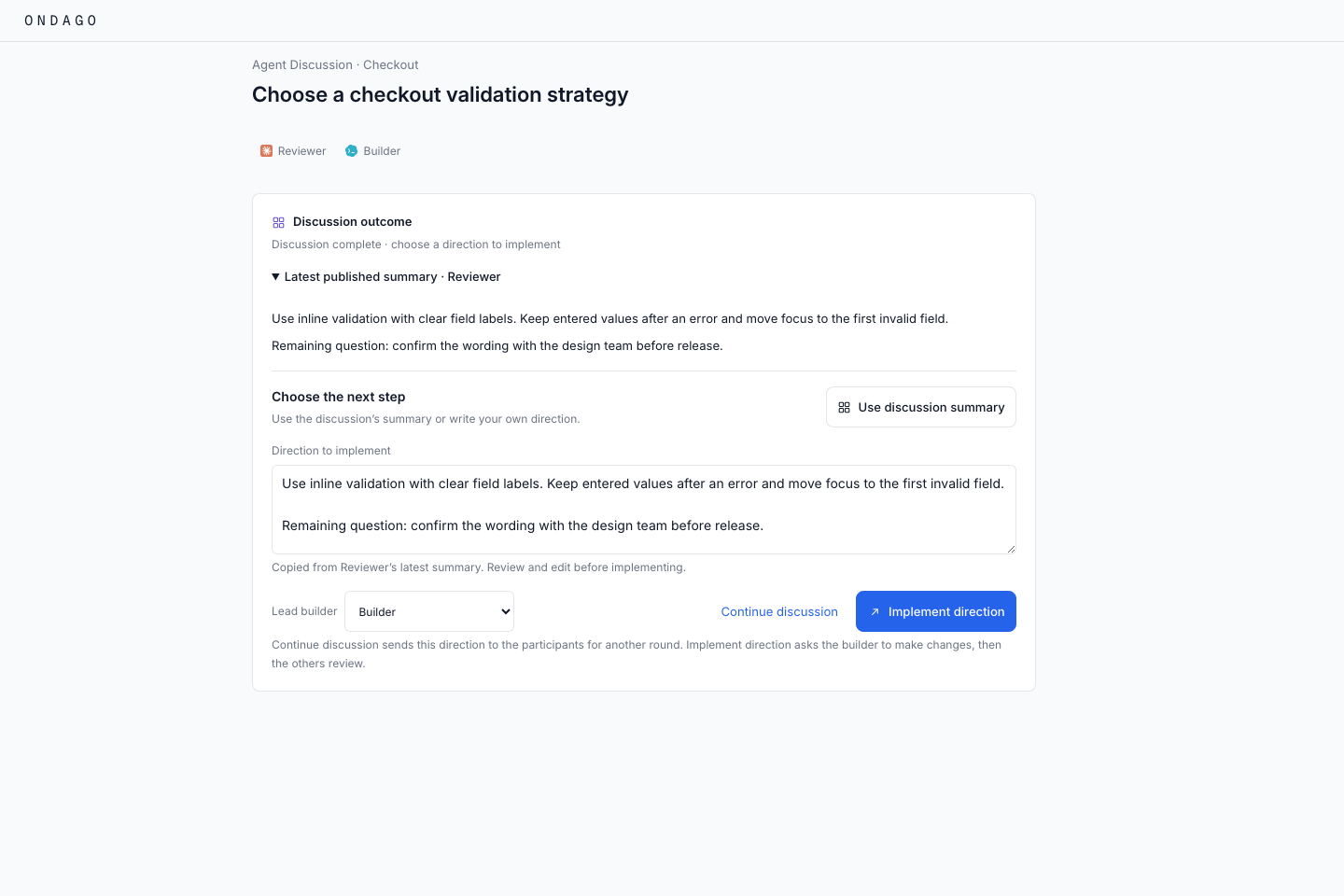
- Read the Latest published summary, including any remaining disagreements.
- Choose Use discussion summary to copy it into Direction to implement, or write your own direction.
- Edit the direction to include your priorities and constraints.
- Choose the Lead builder.
- Select Implement direction to have that participant make changes. The other participants then review the result.
Copying the summary or selecting a builder does not start implementation. If you want another round of discussion first, choose Continue discussion; any direction you entered is sent to the participants for that round.
Stop, queue, and continue#
Stop discussion cancels the active cycle and keeps queued messages. New messages may wait for the next discussion cycle. After a stop or interruption, choose Continue discussion when ready to resume and deliver queued messages.
If the connection drops, reconnect before changing the builder or starting implementation. A read-only viewer can follow the conversation but cannot control the discussion.
Continue a saved discussion#
A saved Agent Discussion preserves the group and its conversation. Use Continue Agent Discussion in the cloud when offered. The destination must support Agent Discussions and have the required agent credentials; follow any account or update prompts before continuing.
Moving an existing local Agent Discussion directly to Ondago Cloud is not supported yet. Continue that discussion on its computer, or start a new discussion in Ondago Cloud. Adding a provider key does not enable this transfer.
See Continue anywhere for location and transfer guidance, and the cloud execution boundary when choosing where to run.
If the discussion cannot start or continue#
- Update prompt: update Ondago on the selected computer or follow the cloud runtime compatibility message.
- Unavailable participant: choose an agent and account available at that location.
- Implement direction is disabled: enter a direction, wait for the active cycle to finish, and confirm the discussion is connected and you have control.
- No published summary: write your own direction or continue the discussion.